Tema ini memiliki beberapa tipografi dan format penulisan yang bisa anda terapkan pada setiap postingan serta beberapa fitur tambahan seperti Tabs Post, Split Post dan lainnya. Not all of the styles below can be used directly in "Writing view" mode, but there are also some features that can only be used from "HTML View" mode. Image with Caption and Auto Lightbox Caption di gambar ini tidak akan terbaca pada deskripsi/snippet artikel. Anda juga dapat memilih untuk tetap membuat caption terbaca pada snippet artikel Semua gambar dalam artikel akan otomatis memiliki fungsi lightbox kecuali gambar dalam tag <figure> , cobalah klik salah satu gambar dalam postingan ini. Image with Grid Layout Image with Show All Function Digunakan untuk menyembunyikan beberapa gambar dan akan ditampilkan ketika user mengklik tombol 'Show All'. Fungsi Show All hanya dapat diaktifkan satu kali, Gambar tidak bisa disembunyik...
Google Drive yang merupakan salah satu layanan situs yang memfokuskan Cloud Storage yang bisa menampung beberapa file sampai maksimal 15 GB untuk akun Google Personal. Kali ini, penulis membahas tutorial cara menampilkan embed video yang bersumber dari Google Drive ke aplikasi Android dengan bantuan Webview melalui Kodular. HAL-HAL YANG DIPERHATIKAN SEBELUM MEMULAI : 1. Pastikan kamu memiliki video di dalam Google Drive. 2. Video tersebut telah diubah "share permission" menjadi anyone, sehingga video tersebut bisa diakses oleh siapa saja di dalam aplikasi Android. A. CARA MENGAMBIL KODE ID VIDEO DARI GOOGLE DRIVE : 1. Kunjungi situs https://drive.google.com/drive/my-drive?hl=id 2. Lakukan login seperti pada umumnya. 3. Carilah file video yang ingin dimasukkan ke dalam aplikasi, klik 2 kali untuk membukanya. 4. Klik ikon titik tiga bawah yang berada di sebelah kanan. 5. Klik Share / Bagikan. 6. Klik Copy Link. 7. Buka halaman tab baru, pastekan ...
Pada artikel kali ini akan dijelaskan mengenai perhitungan ongkos kirim dengan menggunakan API RajaOngkir dengan akun tipe Pro. Perbedaan dengan akun starter sebelumnya adalah pada akun Pro ini terdapat fitur untuk melakukan perhitungan sampai dengan tingkat kecamatan. Tutorial perhitungan ongkos kirim dengan akun starter Berikut ini merupakan penjelasan dari program yang sudah dibuat. Terdapat 2 file dalam folder ini yaitu cek_kecamatan.php dan rajaongkir.php . File utama atau index dari program ini adalah rajaongkir.php. File cek_kecamatan,php berisi kode ajax untuk mendapatkan daftar kecamatan dari suatu kota. ...
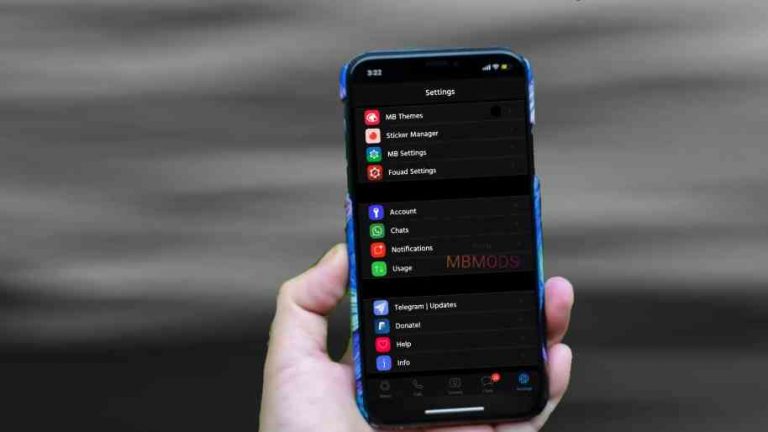
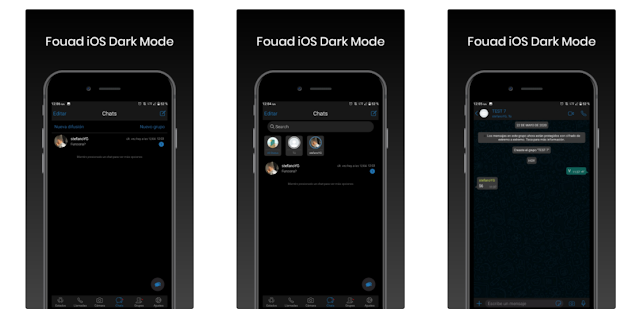
Download WhatsApp Mod: Fouad Whatsapp iOS v9.05 (beta3) APK Latest Version by MBMods
Features of Fouad iOS
What's New in v9.05 (beta3)?
Base Fouad WA v9.05 - (2.21.19.21 Google Play)
New Bubbles iOS.
Since voice notes 2.0 does not work in status, we have removed that option. Don't worry, we've added another way to pause audios.
Added option to hide hidden chats shortcut (within floating dialog).
Re-added option to disable tab scrolling.
Re-added more sound tones to send and receive messages.
Added new options for chat divider:
• Resize the divider
• Change the color of the divider
• Hide the divider
Long click on the text status icons to see more color options.
Added an option to resize large titles on the main screen.
Added an option to resize main titles throughout the interface.
Added an option to resize secondary titles throughout the interface.
Added an option to change the size of the pencil icon, on the main screen.
Re-added camera shortcuts and text status on the status screen.
New option added to customize call style (default iOS style)
The preview has been improved in some settings.
Re-added option to change the color name and date of the contact within a conversation
Added an option to increase the size of stickers (MB Preferences/Others Settings/Sticker Sizer).
Many interface improvements
Fixed the option to upload a status of more than 30 seconds.
Fixed the option to make a new call
Probably fixed option to send images / videos in high quality. (In WhatsApp settings choose between Recommended or Maximum, choose the one you like)
Others Fixed
Some fixes in the interface
Main Features
Privacy and Security: This includes all your chat with reliable, fully featured privacy. Example: app / chat lock, freeze last seen, disable forwarding, who can call me, hide view friend status, Anti-delete status, Anti-delete message, show blue check after replying and privacy group, transmission and contact.
FMThemes - allows you to change themes, download, save, restart, restore, delete, and you can also import themes in the xml format. Chat Backup: You must backup your chat history data before you start using the app. (Restoring the chat is not valid if you have previously used the Clone version of WhatsApp Mod.
General Settings: Includes all color customization settings, new display styles (iOS, Android O, Facebook, One UI), writing style, and launcher icons.
Languages: Indonesian, English, Arabic, Italian, Spanish, German, Turkish, Malay and many more.
HD Image Sharing - You will receive and send high-quality images.
Conversation Cards - You will find chats in the form of cards that can easily be changed to the latest. (Android 5.0+ higher.
Home screen: You can adjust the appearance of the top header, the line, the floating action buttons, the status, the angle of the photo (max 100r) and hide the chat divider.
UI style navigation - You can find it under Fouad Mods> Home Screen> Header.
Bottom bar style: displays a style with a screen like the iOS customization located below the mobile screen navigation. You can choose with iOS, Bubble or basic style.
Activate the Instagram Story style: You will see a status screen / contact stories of other users appear in the top bar. This feature can be disabled at any time.
Separate chats / groups: if you enable this feature, the status page will be replaced by group chats and "stories like Instagram" will be forced.
Dark / Bright Light Mode: allows you to adjust the dark mode display so that it is easily illuminated. Vice versa.
Show airplane mode: operation allows you to stop receiving all messages from anyone.
Changelog
Version 9.05 beta3
27/11/2021
Base Fouad v9.05 2.21.19.21 (Google Play) Added New Bubbles iOS) New Since voice notes 2.0 does not work in status, we have removed that option. Don't worry, we've added another way to pause audios New Added option to hide hidden chats shortcut (within floating dialog) New Re-added option to disable tab scrolling New Re-added more sound tones to send and receive messages Added New options for chat divider:
• Resize the divider
• Change the color of the divider
• Hide the divider Added Long click on the text status icons to see more color options Added an option to resize large titles on the main screen Added an option to resize main titles throughout the interface Added an option to resize secondary titles throughout the interface Added an option to change the size of the pencil icon, on the main screen New Re-added camera shortcuts and text status on the status screen Added New option added to customize call style (default iOS style) Added The preview has been improved in some settings New Re-added option to change the color name and date of the contact within a conversation Added an option to increase the size of stickers (MB Preferences/Others Settings/Sticker Sizer) New Many interface improvements Fixed the option to upload a status of more than 30 seconds Fixed the option to make a new call Fixed Probably fixed option to send images / videos in high quality. (In WhatsApp settings choose between Recommended or Maximum, choose the one you like) Fixed Others Fixed Fixed Some fixes in the interface
Version 9.05 beta2
06/11/2021
Base Fouad v9.05 2.21.19.21 (Google Play) Added New Font iOS Rounded Fixed the error when applying a theme Fixed bug when resetting preferences Fixed bug when changing header style within conversation Fixed bug when changing font in a text status Fixed bug when changing row style in chat list Fixed Others fixeds Fixed Some interface fixes will be fixed soon Fixed Some fixes in the interface
Version 9.0 beta1
05/11/2021
Base Update 2.21.19.21 (Google Play) Added New Emojis Added Emojis iOS by default Added Enabled Fast Scroll in the conversation list New Sending a single emoji will increase its size New Added an option to increase the size of stickers (MB Preferences/Others Settings/Sticker Sizer) New Added an option to change the style of the animated heart (MB Preferences/Others Settings/Large Emoji Style) New Added an option to pause voice notes, and be able to listen to it before sending it New Archived chat screen has been redesigned New WhatsApp Web or Linked Devices screen has been redesigned New Now you can link up to 4 devices without having a connection on your device New Added a lock screen for WhatsApp Web (This way you will prevent other people from linking your WhatsApp without your permission) New Added Download for View Once images/video New Added View All Messages sent by contact in group (click on name) New Many interface improvements Fixed Probably some bugs fixed, don't forget to report another bugs Fixed Some fixes in the interface!
Version 8.96
18/10/2021
Base Update 2.21.11.17 (Google Play) Info Expiration time increased (Until version 9.0 is released) Added Send video and images in high quality (also when publishing a status) Added New style for sticker confirmation New Re-added option to put an image as background on the main screen Added Show the same main screen background within the conversation Added Blur Tab Added Option to change the intensity of the Blur effect Added Option to change the background color of the blur effect Added Some icons have been replaced Added Some translations have been updated Fixed Probably some bugs with the input have been fixed on some devices Fixed Other fixes and performance improvements!
How Install Fouad iOS?
If you want to install Fouad iOS for the first time on your Android device, then you must follow the following steps to achieve a perfect installation:
Make a backup of our chats (Settings> Chats> Backup and click on "Save"). Uninstall the WhatsApp or Modifications that you have installed in the number where you want to install Fouad iOS . Activate, if you have not already activated it, the option "Install from Unknown Sources" or "Unknown Sources", depends on your device. To do this, go to Phone Settings> Security.
Download the package or APK you want to install (below are the download links) Click on the download package or APK and on the first screen click on ACCEPT and CONTINUE.
NOTE: If Play Protect detects you, do not be alarmed, it is because of the Personalized Signature, just click »INSTALL ANYWAY» Follow the steps in the normal way, such as verifying number, entering nickname At the end, when it asks you how often you want to save backups to Google Drive, press NEVER.
Ready, you already have Fouad iOS installed!.
If you are going to update Fouad iOS then the steps are much simpler. Simply download the same package that you have installed on your Android device, and click on it to install it, you will not need to verify the number or other typical things of the installation.
Mungkin ketidaksempurnaan kita yang membuat kita begitu sempurna satu sama lain.Cinta adalah ruang dan waktu yang diukur oleh hati.Cinta terdiri dari satu jiwa yang menghuni dua tubuh.Kamu mungkin memegang tanganku untuk sementara waktu, tetapi kamu…
It seems there is something wrong with your internet connection. Please connect to the internet and start browsing again.
AdBlock Detected!
We have detected that you are using adblocking plugin in your browser. The revenue we earn by the advertisements is used to manage this website, we request you to whitelist our website in your adblocking plugin.
Site is Blocked
Sorry! This site is not available in your country.